Automate the CapEx lifecycle with capital expenditure approval software
eCapEx replaces spreadsheets, emails, and unstable SharePoint solutions with capital expenditure approval software that streamlines the CapEx and OpEx process from project prioritisation and budget setting to request submission/approval and post-investment review.
It offers near-limitless flexibility to meet varied customer-specific requirements covering the end-to-end CapEx lifecycle without lengthy development cycles.
Manual processes
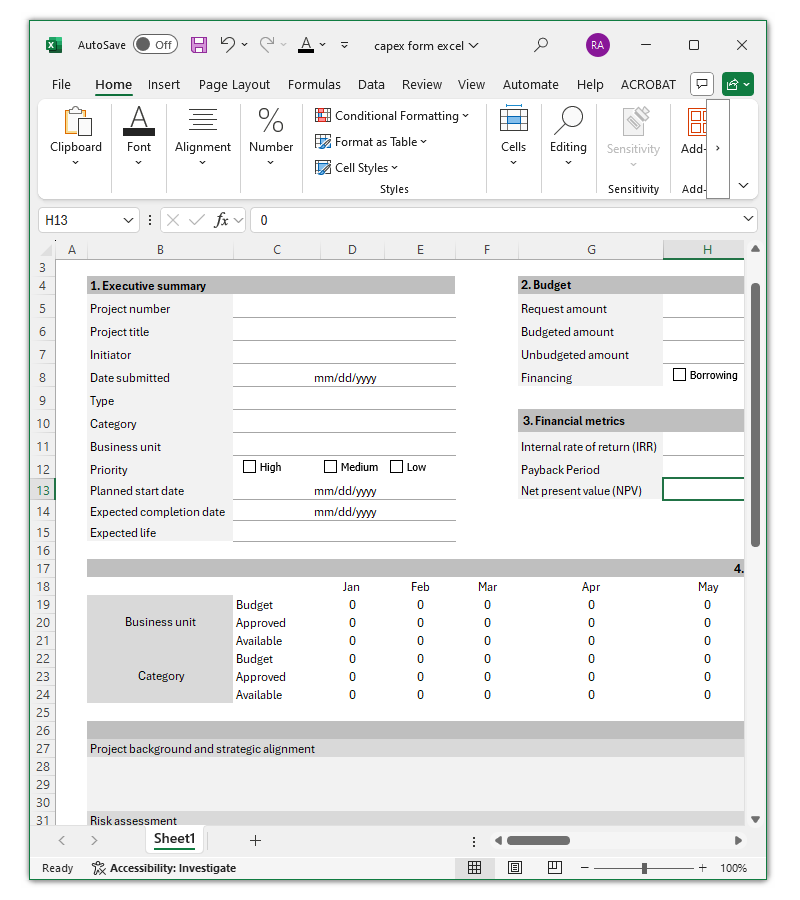
Requests are submitted in various formats, often containing typographical errors, invalid formulas, and incomplete or incorrect information.
An inefficient approval process due to manual routing and rework leads to extended cycle times, bottlenecks, and missed opportunities.
A lack of visibility hampers the ability to monitor the status of a request and track progress, resulting in wasted time chasing updates.
Inconsistent documentation, limited accountability, and failure to adhere to policy can result in inadequate version control, unauthorised access, and poorly informed decision-making.
Manual processes lack oversight, posing a risk of budget overspending, increased costs, and missed targets.
eCapEx
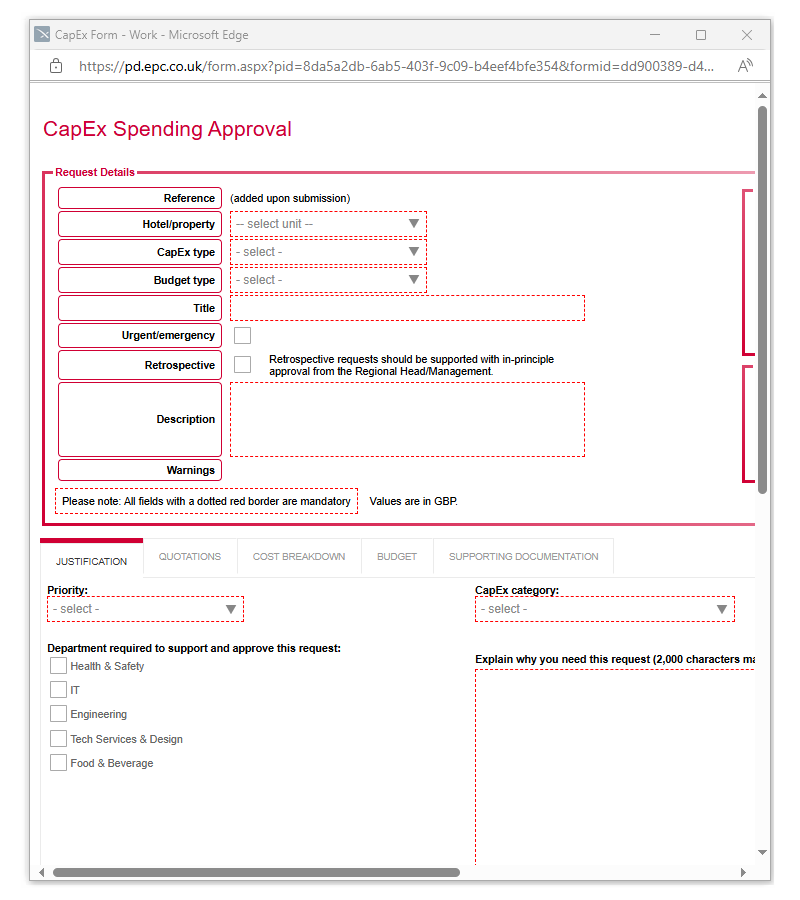
Electronic forms replace Excel with built-in logic and real-time data validation to capture accurate data and instantly submit completed requests/business cases.
Accelerate approvals with automated routing that aligns with your authority matrix, along with notifications triggered by due dates and periods of inactivity.
Increase transparency and tracking of individual projects and the entire CapEx portfolio through a centralised, web-based platform that provides a single source of truth.
Standardised business cases, formalised procedures, rules-based approvals, audit trails, and role-based access controls ensure process compliance and minimise the risk of penalties.
eCapEx provides a comprehensive view of financial performance and seamlessly integrates with ERP and accounting software.
How it works
CapEx planning
Early collaboration with colleagues to identify CapEx needs and submit new ideas/wish list proposals for early consent.
Prioritise projects based on strategic alignment, risk profile, and financial metrics (internal rate of return (IRR), net present value (NPV), and payback period).
Evaluate and rank preliminary ideas based on weighted scores.
CapEx budgeting
Create and collaborate on budgets based on your prioritised list of projects.
Import budgets at the beginning of the financial year, assign them to business units and asset categories, and then adjust, claw back, assign (and reassign) throughout the year.
Effortlessly assign capital expenditure requests to budgets or predefined projects.
CapEx requests and approval
Automatically route capital expenditure requests through an approval, rejection, and clarification workflow.
Send notifications as each step starts and periodic reminders when necessary.
CapEx management and reporting
Configurable dashboards display real-time metrics including project status, cycle times, and budget consumption. The dashboards allow users to apply filters and drill down to display data for more in-depth insight.
You can then export data or schedule an automated report to be sent to colleagues at specific intervals.
CapEx post-investment review (PIR)
Automatically alert users to complete a new tab on the CapEx request after a period of time.
A simple follow-up could ask a user to confirm the request was completed, along with the completion date, final costs, and details. However, a more detailed PIR could include original objectives/forecasts, actual outcomes, and lessons learned.
CapEx budgeting
Create/import CapEx budgets for the financial period and assign them to business units and asset categories with mid-period revisions available.
Link requests to uploaded budgets.
Track actuals vs forecast and closely monitor the remaining budget in the period, including any unplanned deviations at the project level.
Outline the expected phasing of capital expenditures across the financial year for accurate cash flow forecasting.
Compare investments over multiple-year periods.
Get notified if your capital expenditure request will result in overspending and overruns.
Dynamically adapt approvals based on remaining budget status.
Carry forward and re-assign the remaining budget into the next financial period.
Re-allocate budgets for emergency requests.
Handle various payment types, including CapEx/OpEx, write-downs, disposals, multi-year leases, acquisitions, new hires, and legal settlements.
Manage all budget types, e.g. budgeted, unbudgeted, overrun/variance, and reassignment (to another business unit/department, etc.)
CapEx request forms
Eliminate spreadsheets and email approvals and create compelling business cases with standardised CapEx and OpEx request templates.
Show/hide questions, lock fields, add skip logic, set mandatory/optional fields, and pre-populate fields, all based on conditional rules.
Highlight invalid fields and automatically validate data on input and/or submission.
Auto-calculate amounts and prioritise projects based on IRR, NPV, payback period, EVA, RONA, and Hurdle rates.
Show figures in your local currency and global currency.
Automatic translation of capital expenditure approval form templates and user interfaces into your local language.
Upload attachments of any format to support the capital expenditure request.
Upload images to the request and display them as thumbnails to provide evidence.
Save partially completed request forms and submit them later when further information is available.
Lock down capital expenditure request and justification forms, with users no longer able to edit or modify the data.
Add quotes from potential vendors. Select a pre-approved vendor from the drop-down list or enter the supplier name, amount, notes, and reason for choosing the supplier.
Add additional rows as necessary (e.g., mandatory for three quotes).
Escalate urgent/emergency requests via a modified workflow for prompt review and approval.
Display the current budget position by business unit and category, showing the amount approved/available for the current period.
Highlight to the initiator/approver if the requested amount exceeds the remaining budget.
Show the estimated approval steps dependent on the business unit, asset category, amount, or any other fields and rules.
Add time-stamped notes to a capital expenditure request with the Q&As and comments visible to executives later in the approval chain.
Automate capital expenditure approvals
Trigger highly configurable approval, rejection, and clarification workflows with conditions based on asset category, business unit, budgets, and authorisation limits.
Add data integration steps to ingest data from other systems or export data to onward ERP, procurement, or purchasing systems.
Run CapEx approval steps sequentially when you need to receive one approval before another.
Unlike traditional linear workflows that chain steps together sequentially, parallel workflows enable users to work on requests simultaneously, vastly reducing the overall time to approval.
Create separate forms and workflows, but link them together under one case.
From project ideation to post-investment review, the platform connects all phases of your capital project as standalone but interlinked workflows.
This ensures the investment meets predefined criteria before moving to the next stage gate.
Automatically alert users to new tasks with reminders/escalations based on inactivity and due dates.
Approvers can refer to the audit trail associated with a capital expenditure submission when approving a request or reviewing the archives.
Notifications can include approve/reject links while replies can be automatically processed for keywords. This allows participants to quickly complete tasks when out of the office/offline.
An iOS/Android mobile app is available.
You can build custom rules into your approval workflow.
Some examples include allowing the administrator to cancel an approved request, thereby returning the budget. Other scenarios include auto-cancelling clarification or rejection steps after two weeks, or purging rejected and unapproved requests over seven years old.
CapEx management and reporting
Configurable web workspaces are customised to different user roles and serve as the primary interface to the system.
Authorised users can initiate new workflows, view dashboards, search archived requests, collaborate with colleagues, and manage the system.
Configure and combine task lists, tabular data, and chart/graph widgets to display real-time metrics at the project level (and entire portfolio), including project status, cycle times, progress, and budget consumption.
This allows the initiator to monitor the status of pending/approved projects. At the same time, business leaders can track the CapEx budget by asset category/business unit/region/amount used (requested and/or approved).
The dashboards allow users to apply filters and drill down to display data for more in-depth insight.
You can then export data or schedule an automated report to be sent to colleagues at specific intervals.
Export data to pre-configured Excel templates for reporting and analysis or integrate with other line-of-business (LOB) or business intelligence (BI) applications.
Centralised control, security, and management of supporting documents, including justifications and risk assessments.
Collaborate with colleagues and simultaneously author/mark up documents, spreadsheets, and presentations.
Application integration
The system supports direct integration, web services, and REST/SOAP calls to provide access to a wide variety of in-house and third-party services.
Its .NET-based Software Development Kit (SDK) enables near limitless capabilities to create reusable custom tasks and integrations.
Additionally, you can export data to legacy systems through Robotic Process Automation (RPA) or flat file formats (e.g., CSV, Excel).
Security and data protection
Audit trails
Track and record every transaction (reviews, edits, approvals/rejections, comments, and other actions) so they can be retraced later by managers, auditors, and regulators.
Single sign-on (SSO)
Support for SAML-based authentication for SSO with your existing corporate user directory.
Integrate with directories such as on-premise Active Directory (AD) and cloud-based Microsoft Entra ID (formerly Azure Active Directory).
Data encryption
The system uses standard web security protocols (such as HTTPS over TLS 1.3) to encrypt data in transit.
Multiple layers of encryption are used for all data at rest.
Multi-factor authentication (MFA)
Integration with industry-standard identity and authentication platforms allows you to incorporate MFA into the user logon process.
Role-based access controls
Create named user accounts and set granular permissions to track activity and prevent unauthorised access to workspaces and sensitive documents.
Powerful technology
The platform runs on the well-supported and reliable Windows, IIS, SQL and ASP.NET platforms from Microsoft. This means we can leverage the inherent security, scalability and reliability features in the capital expenditure approval and tracking software.
Hosting
The CapEx software is available on-premise or cloud-hosted.
The cloud-hosted option (with a 99.9% uptime guarantee) includes ongoing technical support and maintenance with system updates/enhancements automatically rolled out to users.
UK and worldwide data centres
Our data centres are UK-based and fully compliant with UK GDPR, ISO 27001, and Cyber Essentials. The underlying platform, Process Director, is SOC2 certified.
If you prefer, we can host your capital expenditure software within the Microsoft Azure global infrastructure, allowing you to keep your business-critical data in any region and comply with relevant legislation.
Chris Broe
Group CIO
Rentokil Initial
Aung Kyaw Moe
Vice President, Global IT Infrastructure & Cybersecurity
Millennium Hotels and Resorts
Professional services
Our professional services team is here to make your implementation as smooth as possible.
While the platform is incredibly intuitive, some clients may not have the time or resources to build the solution themselves.
At ePC, we have a team of experts available to support you with demonstrations, requirements gathering, proof of concept (PoC), statement of work (SOW), development, externally accessible prototypes, system testing, user acceptance testing (UAT), and training/support/documentation.
Whether you prefer to build the system internally or require our professional services team to deliver a customised solution, we can streamline your CapEx lifecycle – without lengthy development cycles.
Latest news
Contact us
Are you looking to automate your capital expenditure approval processes?
To demonstrate the value of eCapEx to key decision-makers in your organisation, we invite you to book a free, no-obligation demonstration to see how the capital expenditure approval software can meet your requirements.
Alternatively, please call 03300 100 000 to discuss your requirements.
We will not share your details outside of our organisation and will only contact you to discuss your enquiry. Read our privacy policy.